FundMySite – WordPress Fundraising Plugin v1.2
FundMySite
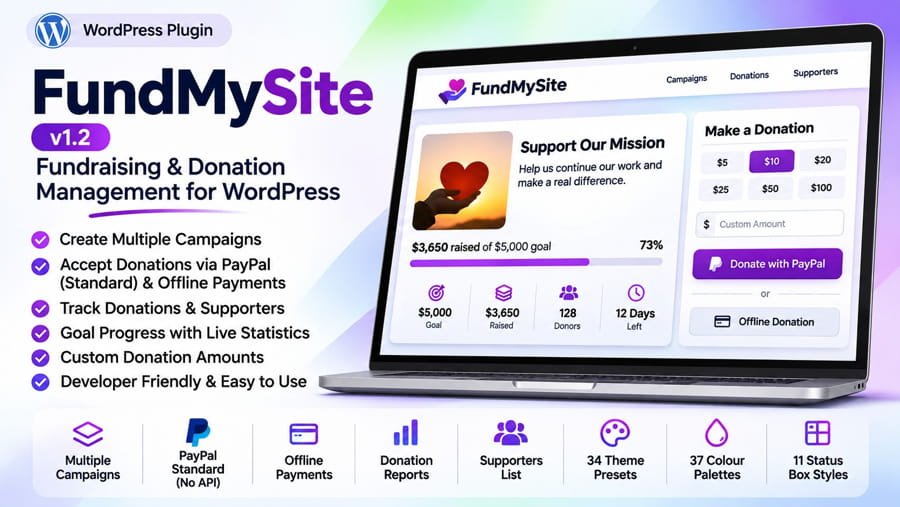
Turn your WordPress website into a complete fundraising hub. Create campaigns, accept donations, track contributions and keep supporters informed — all from one easy-to-use dashboard.
About FundMySite
FundMySite is a flexible WordPress fundraising and donation management plugin designed for charities, community projects, non-profit organizations, website owners and individuals who want to collect and manage contributions directly through their own website.
Create individual fundraising campaigns with custom goals, currencies and deadlines. Display live fundraising progress, provide suggested or custom donation amounts, accept payments through PayPal or offline methods, and manage every donation from a centralized administration area.
Get the WordPress plugin package.
Key Features
Campaign Management
Create multiple campaigns with individual fundraising goals, currencies, start/end details, suggested amounts, custom thank-you messages and open/closed controls.
Live Progress Tracking
Display raised totals, remaining amounts, donor counts and progress bars so visitors can follow each campaign’s progress.
PayPal Standard Checkout
Accept donations using a PayPal account email. No API keys are required. Payment completion is verified through PayPal IPN, with optional PDT backup confirmation and sandbox testing.
Offline & Bank Transfers
Allow donors to pledge through bank transfer, UPI or another offline method using your own payment instructions. Entries remain pending until confirmed by an administrator.
Flexible Donation Forms
Offer preset amounts or custom donations, with configurable minimums and options to collect donor name, email, phone number and a message.
Supporters Wall & Privacy
Showcase supporters who agree to appear publicly. Donors can choose not to display their names, and administrators can control whether amounts and dates are shown.
Donation & Donor Management
View, search, filter, sort, edit and manage donation records, update payment statuses, add manual donations and manage donor information.
Email Notifications
Send configurable donation receipts to donors and new-donation notifications to administrators, using customizable message templates and merge tags.
Reports & Dashboard
Review donation totals, recent contributions, top campaigns and monthly activity through the FundMySite dashboard and WordPress dashboard widget.
Import, Export & Backup
Import donations from CSV, export donation records, and back up or restore plugin settings, campaigns and donation data. Includes migration support for Simple Fundraiser.
Appearance Customization
Choose from 34 theme presets, 37 colour palettes and 11 status-box styles. Preview changes and add custom CSS to match your website.
External Support Links
Add extra support buttons for services such as Buy Me a Coffee, Ko-fi or PayPal.Me. External payments must be recorded manually because they are not automatically verified by the plugin.
Shortcodes
Place campaign listings, donation forms, progress indicators and donor information anywhere shortcodes are supported.
[fundmysite_campaigns number="6" columns="3"] — Display a campaign listing.
[fundmysite_campaign id="12"] — Display an individual campaign.
[fundmysite_donation_form campaign_id="12"] — Show a donation form.
[fundmysite_progress id="12" donate="1" support="1"] — Show campaign progress and support buttons.
[fundmysite_donors campaign_id="12"] — Display campaign supporters.
[fundmysite_stats campaign_id="12" type="raised"] — Display campaign statistics.
[fundmysite_thankyou] — Display the donation receipt/thank-you page.
[fundmysite_my_donations] — Let donors view their donation history.
Installation
- Download the FundMySite plugin ZIP file.
- In your WordPress dashboard, navigate to Plugins → Add New Plugin → Upload Plugin.
- Select the downloaded ZIP file and click Install Now.
- Activate FundMySite.
- Open FundMySite → Settings to configure your currency, campaigns, payment methods, donation form and appearance.
- Enter your PayPal account email under Payment Gateways if you want to accept PayPal donations, then make a small test payment.
Requirements & Compatibility
- WordPress 5.8 or newer
- PHP 7.4 or newer
- Tested up to WordPress 6.8 (as listed by the plugin)
- PayPal account required to accept PayPal payments
PayPal donations are marked completed after the plugin receives and verifies PayPal’s payment notification. Offline donations remain pending until an administrator confirms them. Payments made through external services such as Buy Me a Coffee or Ko-fi are not automatically tracked and should be entered manually.
License
GNU General Public License v2 or later (GPL-2.0-or-later).
Download FundMySite and start building your campaigns.